
Nous en parlions ensemble il y a quelque temps lorsque je vous ai expliqué comment configurer Wireguard sur mon UDM Pro SE. La mise à jour d’Unifi OS 3.0 était nécessaire et n’était pas encore disponible pour les UDM et UDM Pro. Et bien sachez qu’elle est maintenant en cours de déploiement et que si vous ne l’avez pas encore de disponible ce sera le cas dans les prochains heures ou jours.
Sommaire masquer
Qu’apporte Unifi OS 3.0 ?
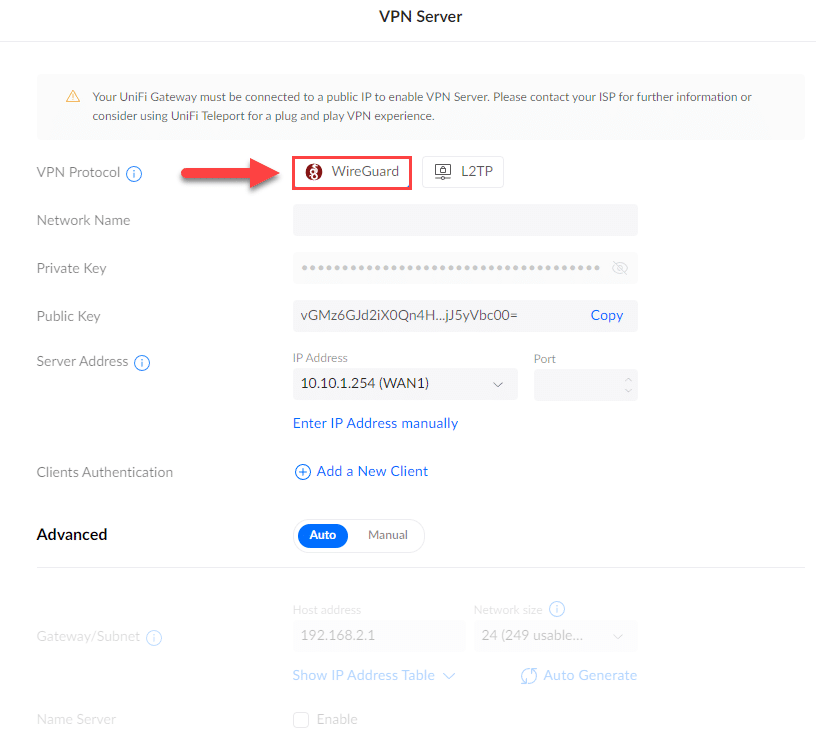
Wireguard
L’ajout de Wireguard est peut être l’une des fonctionnalités qui était la plus attendue d’Unifi OS 3.0.
WireGuard est un protocole VPN open source qui privilégie la sécurité et la simplicité. Il a été créé en 2017 par Jason Donenfeld, un chercheur en sécurité et développeur, en réponse aux solutions VPN existantes qu’il considérait comme lentes et compliquées.
L’un des points forts de WireGuard est son utilisation de la cryptographie moderne. Il utilise le chiffrement symétrique ChaCha20 avec Poly1305 pour l’authentification des messages. Ce chiffrement est considéré comme étant plus rapide et plus sûr que les algorithmes de chiffrement traditionnels.
WireGuard est également connu pour son utilisation de clés publiques pour l’authentification des utilisateurs. Cela signifie que les utilisateurs n’ont pas besoin de partager un mot de passe pour se connecter au réseau VPN.
Cette fonctionnalité est maintenant disponible dans la partie VPN Server de votre UDM.
Ad Block
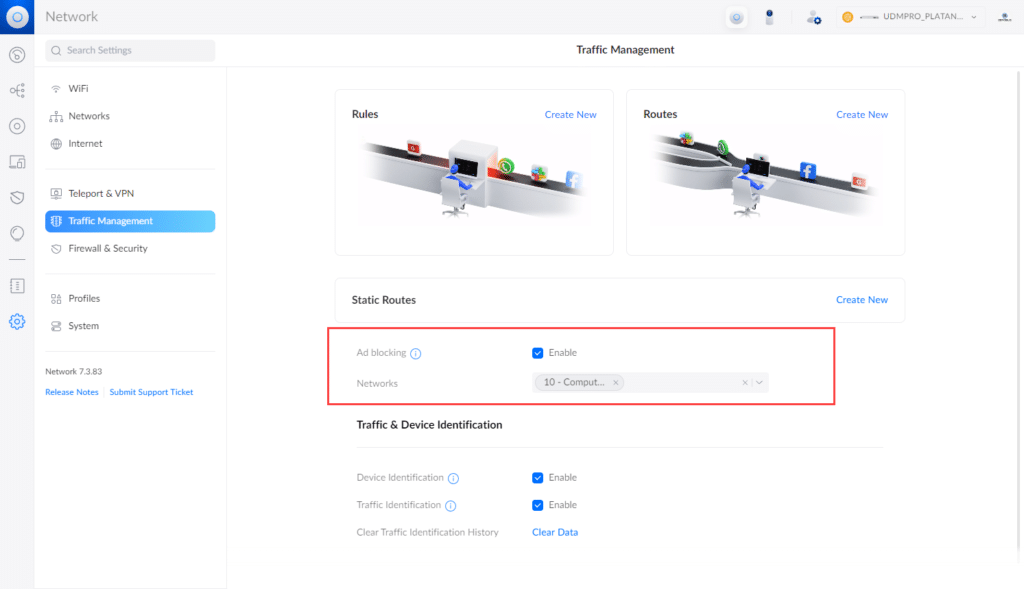
Le blocage des publicités est une fonctionnalité disponible dans la section Trafic Management de l’application Réseau. Elle permet de réduire le nombre de publicités que vous rencontrez lorsque vous naviguez sur Internet. Cela se fait en utilisant le DNS pour bloquer les domaines publicitaires courants . Une fois qu’un domaine est bloqué, toutes les annonces diffusées par ce domaine seront également bloquées.
Mais aussi…
Cette nouvelle mouture d’Unifi OS apporte de nombreuses fonctionnalités que je ne vais pas forcément listé ici, mais on notera tout de même l’ajout du routage client VPN, une meilleure journalisation, un tableau de bord amélioré et bien plus !
https://pagead2.googlesyndication.com/pagead/ads?client=ca-pub-9960398322725539&output=html&h=280&slotname=4353807789&adk=4137518927&adf=1138032768&pi=t.ma~as.4353807789&w=720&fwrn=4&fwrnh=100&lmt=1770631850&rafmt=1&format=720×280&url=https%3A%2F%2Fwww.tech2tech.fr%2Fubiquiti-unifi-os-3-0-disponible-pour-tous-udm-udm-pro-et-udm-pro-se%2F&fwr=0&rpe=1&resp_fmts=3&aieuf=1&aicrs=1&uach=WyJXaW5kb3dzIiwiMTkuMC4wIiwieDg2IiwiIiwiMTQ0LjAuMzcxOS4xMDQiLG51bGwsMCxudWxsLCI2NCIsW1siTm90KEE6QnJhbmQiLCI4LjAuMC4wIl0sWyJDaHJvbWl1bSIsIjE0NC4wLjc1NTkuMTEwIl0sWyJNaWNyb3NvZnQgRWRnZSIsIjE0NC4wLjM3MTkuMTA0Il1dLDBd&abgtt=9&dt=1770644379387&bpp=1&bdt=28&idt=24&shv=r20260204&mjsv=m202602030101&ptt=9&saldr=aa&abxe=1&eo_id_str=ID%3D812dcd72ef6a81a0%3AT%3D1770643965%3ART%3D1770644278%3AS%3DAA-AfjalaulRhWuWuLNFaUWieuU0&correlator=8300260743255&frm=20&pv=2&u_tz=60&u_his=4&u_h=1080&u_w=1920&u_ah=1032&u_aw=1920&u_cd=24&u_sd=1&dmc=8&adx=395&ady=3262&biw=1897&bih=924&scr_x=0&scr_y=0&eid=31096619%2C95378429%2C95381032%2C95381248%2C95382331%2C95382340%2C95382735%2C42533293&oid=2&pvsid=375431971407987&tmod=533820104&uas=1&nvt=1&ref=https%3A%2F%2Fwww.tech2tech.fr%2F&fc=640&brdim=1920%2C0%2C1920%2C0%2C1920%2C0%2C1920%2C1032%2C1912%2C924&vis=1&rsz=%7C%7CoeEbr%7C&abl=CS&pfx=0&fu=128&bc=31&bz=1&pgls=CAEaBTYuOC4z&ifi=1&uci=a!1&btvi=1&fsb=1&dtd=32
Comment mettre à jour vers Unifi OS 3.0 ?
Mettre à jour Unifi est très simple, veuillez noter que pour passer sur Unifi OS 3.0 il faut déjà être au minimum sur Unifi OS 2.5.17 ou plus récent.
Depuis votre console web Unifi OS, cliquez sur Applications, puis dans la section Unifi OS, vous devriez avoir la possibilité de cliquez sur « Update » pour passer sur Unifi OS 3.0.
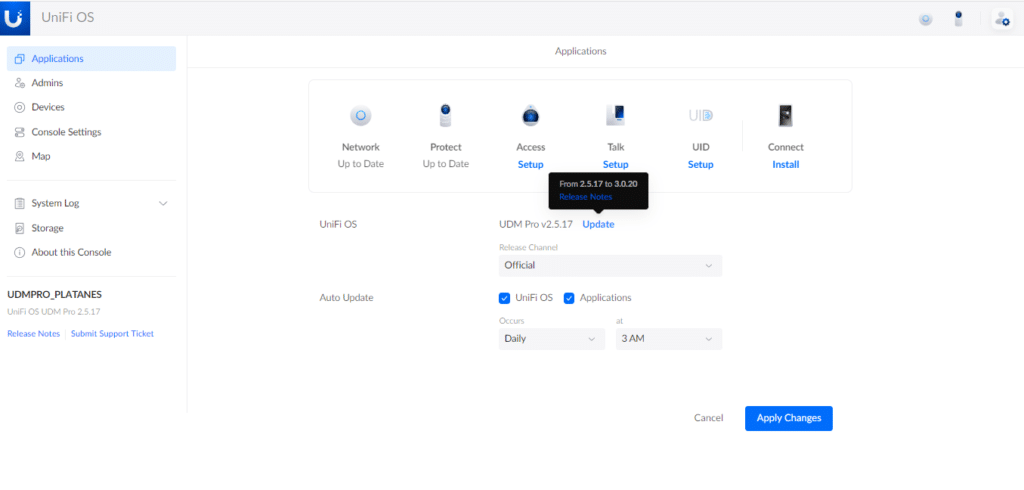
La mise à jour prendra quelques minutes et coupera temporairement l’accès à votre gateway, prévoyez donc de faire ça pendant un moment opportun.
Il est également possible de mettre à jour via SSH en utilisant les fichiers BIN correspondant à votre UDM. Télécharger le Firmware Unifi OS 3.0.20 pour UDM Télécharger le Firmware Unifi OS 3.0.20 pour UDM Pro
Changelog complet
Improvements
- Redesigned UniFi OS Application page.
- Added Ad Blocking feature.
- Added Admin Activity to System Log in UniFi OS.
- Added Storage events to System Log in UniFi OS.
- Added Cloud connection events to System Log in UniFi OS.
- Added Trigger logs in the Network Application.
- Added support for DHCP Client option 77 and 90.
- Upgraded Debian distribution to Bullseye.
- Upgraded NodeJS to 16.14.2.
- Upgraded PostgreSQL to 14.5-1.
- Updated password rules for local accounts.
- At least 12 characters.
- Allow having a space.
- Only allow strong strength-level passwords.
- Updated Traffic Identification Signatures.
- Updated GeoIP Database.
- Updated bundled Suricata configuration for Threat Management.
- Improved PPPoE Connection stability when IP6CP negotiation fails.
- Improved mechanism for detecting disk insert and remove event.
- Improved connection stability between console and Network application.
- Improved performance when checking for firmware and application updates.
- Improved stability for direct connection.
- Improved disk formatting flow for when the console is reset with disk inserted.
- Improved email and push notification stability.
- Auto-update all installed applications including non-setup applications when auto-update for applications is enabled.
- Application actions during console boot-up are now disabled until boot-up is finished.
- Check for application updates immediately after switching the Release channel.
- Persist console invitation after a console reboot.
- Decreased the amount of DNS traffic to the bare minimum via U-LTE when it is not active.
- Optimized DNS Filtering events to prevent spamming and CPU Consumption.
- Changed the menu title to uppercase on the touchscreen.
- Changed the splash screen title to « Starting » on the touchscreen.
- Show ISP name in Internet-related error screens.
- Updated UI logo on screen/touchscreen.
- Updated UNC count threshold to 5 for disk-at-risk warnings.
- Updated the integrated Access Point firmware to 6.5.30.
VPN
- Added WireGuard VPN Server support.
- Added VPN Client routing.
- Added support for OpenVPN tunnel in Traffic Routes.
- Added OpenVPN tunnel in Traffic Rules.
- Allow adding multiple VPN Clients.
- Report OpenVPN Site-to-Site VPN events to the Network application.
- Improved IPsec Site-to-Site VPN stability.
Backup
- Improved UX for Config Backup Restore during setup.
- Improved UniFi OS backup restore resiliency.
- Correctly re-enable the application to match the backup state after the backup restore.
- Disable applications accordingly to match the state in the backup file after restoration.
Setup
- Improved landing page during setup.
- Improved UX for creating UI account during setup.
- Show the WAN MAC address in the « No Internet Detected » screen, during initial setup.
- Disconnect all SSH sessions after setup.
Bugfixes
- Fixed link issue when using the UF-RJ45-1G module.
- Fixed scheduled traffic rule issues related to DST.
- Fixed incorrect application installation status detection in UniFi OS.
- Fixed timezone validation for some cities (e.g. Kiev <=> Kyiv).
- Fixed incorrect « Power on Hours » value for some disk models.
- Fixed issue modifying existing domain-based traffic rule.
- Fixed the LTE WAN failover state not showing correctly on the Network application.
- Fixed WAN1 not failing over in the event of packet loss.
- Fixed not removing some configurations when removing a U-LTE device.
- Fixed stopped applications starting up automatically after a disk reform or re-plug during runtime.
- Fixed rare UniFi OS Crash when disabling applications.
- Fixed allow-list for Ad blocking, requires Network application 7.4 or newer.
- Fixed issue related to IGMP Snooping.
- Fixed a rare kernel crash when setting an SFP+ port to a fixed speed.
- Fixed connection issues with some GPON modules.
- Enable/Disable the application after updating it to match your preference.
- Avoid repeated application update notifications for the same version.
VPN
- Fixed L2TP VPN clients not showing correctly in certain cases.
- Fixed corrupted IPsec Site-to-Site VPN rx/tx counters when the number reaches to 2Gb.
Backup
- Fixed the « Restore Console with a Backup File » page during setup when there is a large number of backups.
- Restore auto-update settings after restoring UniFi OS backup.
Additional information
- You must be on 2.5.17 or newer in order to update to this version, DO NOT update from an older release.
- After updating to 3.0.20, you can no longer downgrade to versions older than 3.0.9.
Finding a trustworthy spot can be tricky but this one feels solid from day one. I really appreciate the clean design and how smoothly it runs on mobile. It turns my lunch breaks into something I actually look forward to. Try it out at myiscr2u
Accessing your favorite titles should never be a hassle and this link makes it completely seamless. The dashboard is intuitive and everything syncs perfectly across my devices. I really respect how they maintain steady uptime even during major tournaments. It is the kind of place where you can just relax and let the good times roll pin77casinolink
This platform feels like home for weekend relaxation. I appreciate the straightforward rules and fair mechanics across all my favorite table games. The interface loads instantly even on my older phone which is a huge plus. bdf555
Friendly interface that makes navigation a breeze even for newcomers. I got my first bonus within an hour and the terms were completely fair. Customer service is always available and genuinely helpful. Will keep coming back. 112233bajilogin
I used to skip online gaming because of slow support but this site completely changed my routine. The team replies fast and the bonuses actually show up without tricky fine print. A warm little corner where regular players can unwind and enjoy honest entertainment. bdabu8
I switch platforms all the time but this one keeps me coming back for more. The deposit options are flexible and I love how quickly they handle my requests. Everything runs perfectly on both desktop and mobile. If you want a relaxed and fair gaming session you know where to go keopu88
Walking into this space felt like a warm hello from friends who actually know what makes online gaming stand out. The curated lists are spot on and the support team answers questions within minutes. I finally found a spot that treats players like humans not numbers. hellovina